


An audio cleanup integration has more steps than sending a file and waiting for a response. Your application needs to upload reliably, recover an interrupted request, understand when a task is finished, and retrieve a verified result. Audio Cleaner on API Basket provides that workflow for both audio and video.
This guide walks through a complete Python integration, then explains the HTTP requests behind it. You will learn where credits are reserved, how to retry without creating another task, and how to verify the downloaded artifact. Start with a short supported file so you can inspect each step before integrating larger uploads.
Choose your operation
Each operation has a separate create endpoint under https://gateway.apibasket.com/media/audio-cleaner. Choose the endpoint for your intended result; do not send an operation override in the request body.
| Operation | Use it for | Successful processing fee |
|---|---|---|
denoise_audio | Reducing background noise in an audio file | 50 credits per rounded-up audio minute |
denoise_video | Reducing background noise in a video's selected audio track | 50 credits per rounded-up audio minute |
inspect_media | Checking media information | 10 credits per successful inspection |
analyze_audio | Measuring audio technical metrics | 15 credits per channel-minute |
generate_waveform | Producing waveform data | 10 credits per channel-minute |
The upload limit is 1 GiB. Supported duration is 3 seconds to 24 hours, with 1, 2, 6, or 8 original input channels. Call capabilities for current formats, sample rates, retention, and concurrency limits. The filename extension, Content-Type, and verified container must agree.
The examples below use denoise_audio. The same upload and task-management flow applies to the other four operations. Keep the Audio Cleaner API reference available for full request schemas and the market page for the published capabilities.
Run the complete Python workflow
Use Python 3.11 or later. The complete reference client uses the standard library, streams downloads, and stores the task's recovery information locally.
Download it from API Basket:
curl --fail --show-error \
  https://apibasket.com/skills/audio-cleaner/v1/scripts/audio_cleaner.py \
  --output audio_cleaner.py
Make API_BASKET_KEY available through your environment or secret manager. Keep the key out of source control, screenshots, and logs. Set the API and function versions explicitly:
export AUDIO_CLEANER_API_VERSION=1.0.0
export AUDIO_CLEANER_FUNCTION_VERSION=1.0.0
python3 audio_cleaner.py capabilities
The /v1/ in the client's download URL is the Skill resource version. The API headers use 1.0.0. The client normally follows the selected API version's current release; set AUDIO_CLEANER_RELEASE only when intentionally pinning a release shown in the documentation.
Before uploading, understand the charge: creating a task is free, but the first upload credentials reserve 50 credits. Successful processing then costs the operation's published rate. The --upload flag explicitly starts that paid workflow.
python3 audio_cleaner.py run input.wav \
  --operation denoise_audio \
  --state task.json \
  --upload
This creates the task, saves its identity, uploads the file in parts, completes the upload, and polls until a result or terminal state is available. It prints verified usage and the successful processing fee. It does not automatically claim or download the result.
If your process stops, preserve task.json and resume:
python3 audio_cleaner.py resume --state task.json
If the upload itself was interrupted, select the original file again:
python3 audio_cleaner.py resume --state task.json \
  --file input.wav --upload
The saved state fingerprints the input and rejects a different file. Do not replace the state file to recover an uncertain request: doing so loses the original task and idempotency keys.
Once the task succeeds, explicitly claim and download its result:
python3 audio_cleaner.py resume --state task.json \
  --claim --download-dir results
The client checks each artifact's byte count and SHA-256 before moving the completed file into place. Treat a checksum mismatch as an incomplete delivery, not a usable output.
Understand the HTTP flow
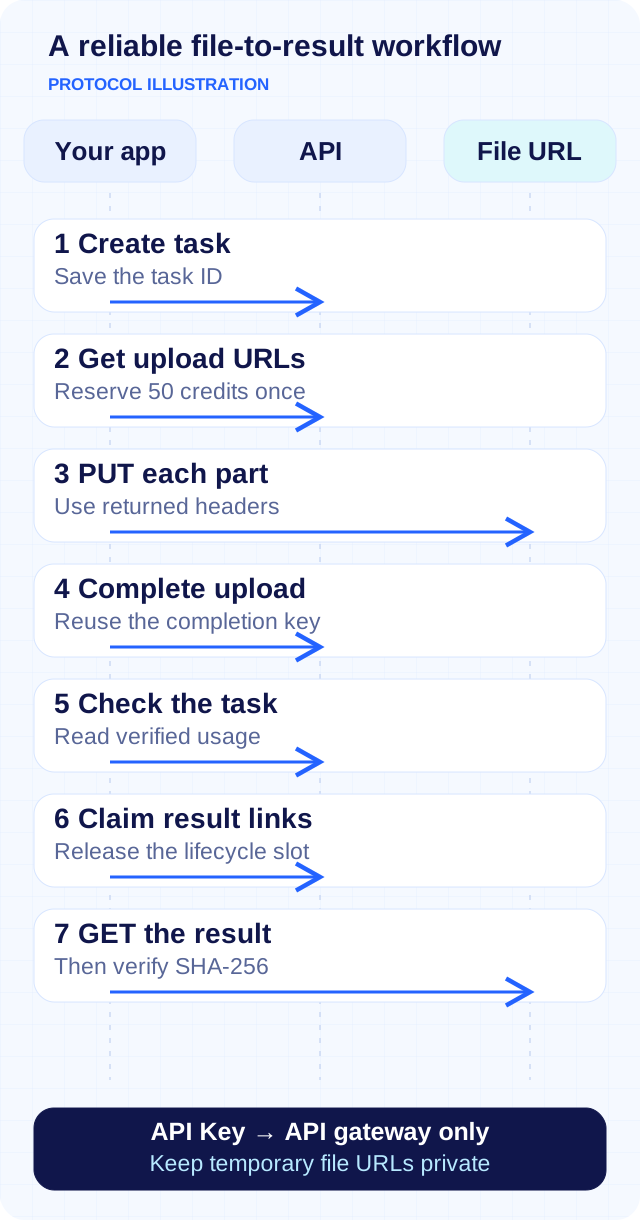
Protocol illustration. Control requests use the API gateway; file bytes travel through the temporary URLs returned for that task.
Create the task
Send POST /denoise_audio with the file metadata, Authorization: Bearer …, version headers, and a stable Idempotency-Key. For example:
{
  "file_name": "input.wav",
  "content_type": "audio/wav",
  "file_size_bytes": 286718
}
Compute file_size_bytes from your actual file; the number above is illustrative. The response includes task, part_size_bytes, part_count, and upload_expires_at. Save these before proceeding. Creation occupies a lifecycle slot even though it does not charge credits.
Gateway execution responses may wrap the operation result in resp, accompanied by timing and precharge fields. The reference client unwraps that envelope for you. In your own client, distinguish the envelope from the task's actual response.
Request credentials and upload parts
Split the file into 8 MiB parts, except for the final part. Calculate each part's MD5 and encode the digest in base64. Request credentials with POST /upload_parts:
{
  "task_id": "00000000-0000-4000-8000-000000000001",
  "parts": [
    {
      "part_number": 1,
      "content_md5": "AAAAAAAAAAAAAAAAAAAAAA=="
    }
  ]
}
The task ID and digest here are placeholders. Use the real task ID and the MD5 of that part. Request at most 100 upload credentials at once; each is valid for 15 minutes.
The first successful credential request reserves 50 credits before URLs are issued. Further parts, renewed credentials, and retries do not reserve another 50 for that task. upload_parts does not require a client idempotency key: the task identity provides financial deduplication.
Upload each part with a direct PUT to its returned URL, using exactly the returned headers. Never attach your API Basket Authorization header to an upload or download URL. Keep temporary URLs and tickets out of logs and saved state.
Complete the upload and poll
After every part succeeds, call POST /upload_complete with task_id and that action's own stable idempotency key. The task enters the queue. Use GET /get_task?task_id=… to check progress; polling is separate from processing and settlement.
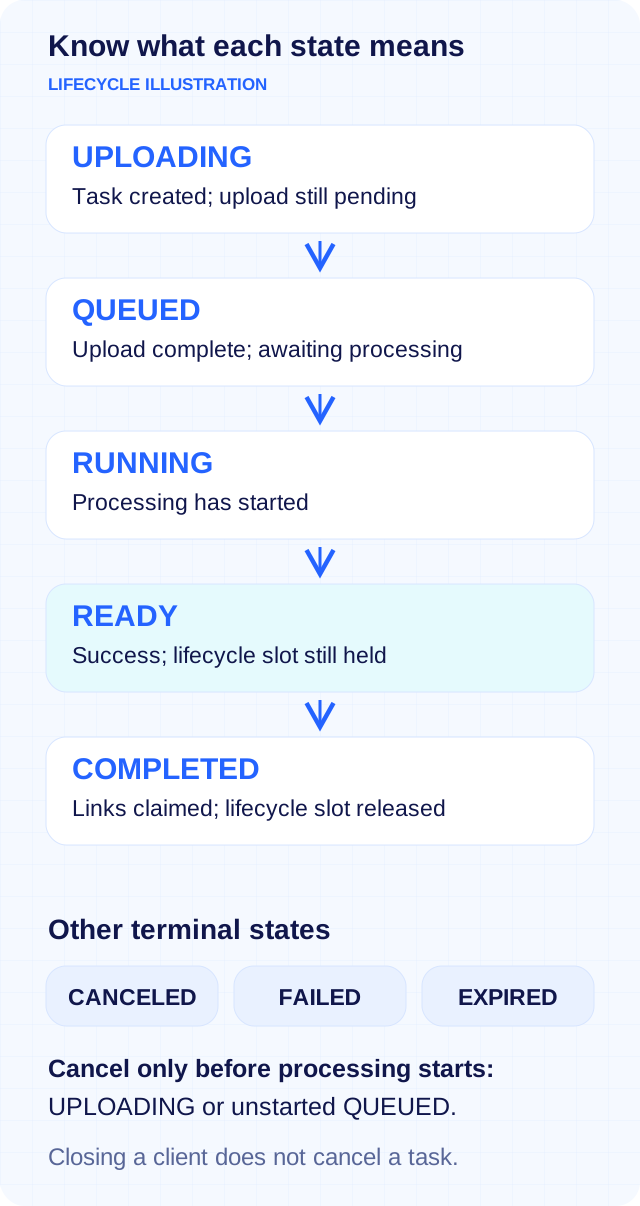
State illustration. READY means processing succeeded; COMPLETED means result credentials have been claimed.
Closing Try, stopping polling, or terminating your client does not cancel the task. Successful processing settles even if no client polls again. Resume with the saved task ID when your application reconnects.
Make retries safe
All POST functions except upload_parts require an Idempotency-Key of 16–200 characters. Generate and persist a separate key for each logical modification, such as create, complete, claim, cancel, or purchase. Reuse that action's key and exact request when its outcome is unknown.
For example, a lost response to upload_complete is not evidence that the upload failed. Check the existing task, then continue the original intent. Creating another task introduces another lifecycle slot and potentially another reservation.
If an upload URL expires, request fresh credentials for the same part of the same task. If credits are insufficient before signing, add credits and retry the original task. For an interrupted file transfer, preserve the original input and part numbering.
The reference client records task metadata, file fingerprints, and idempotency keys in its state file. It does not save your API Key, signed URLs, or media contents there. Protect the state file and retain it until the task and its financial outcome are understood.
Read verified usage and retrieve results
Before success, usage is null. After success, read the server-verified snapshot rather than estimating a bill from the filename, local file metadata, or output waveform channels. An illustrative 61-second stereo task reports:
{
  "duration_seconds": "61",
  "channels": 2,
  "billable_minutes": 2,
  "billable_channel_minutes": 4
}
duration_seconds is a decimal string; the remaining fields are integers. Missing successful usage is a reconciliation problem, not zero usage.
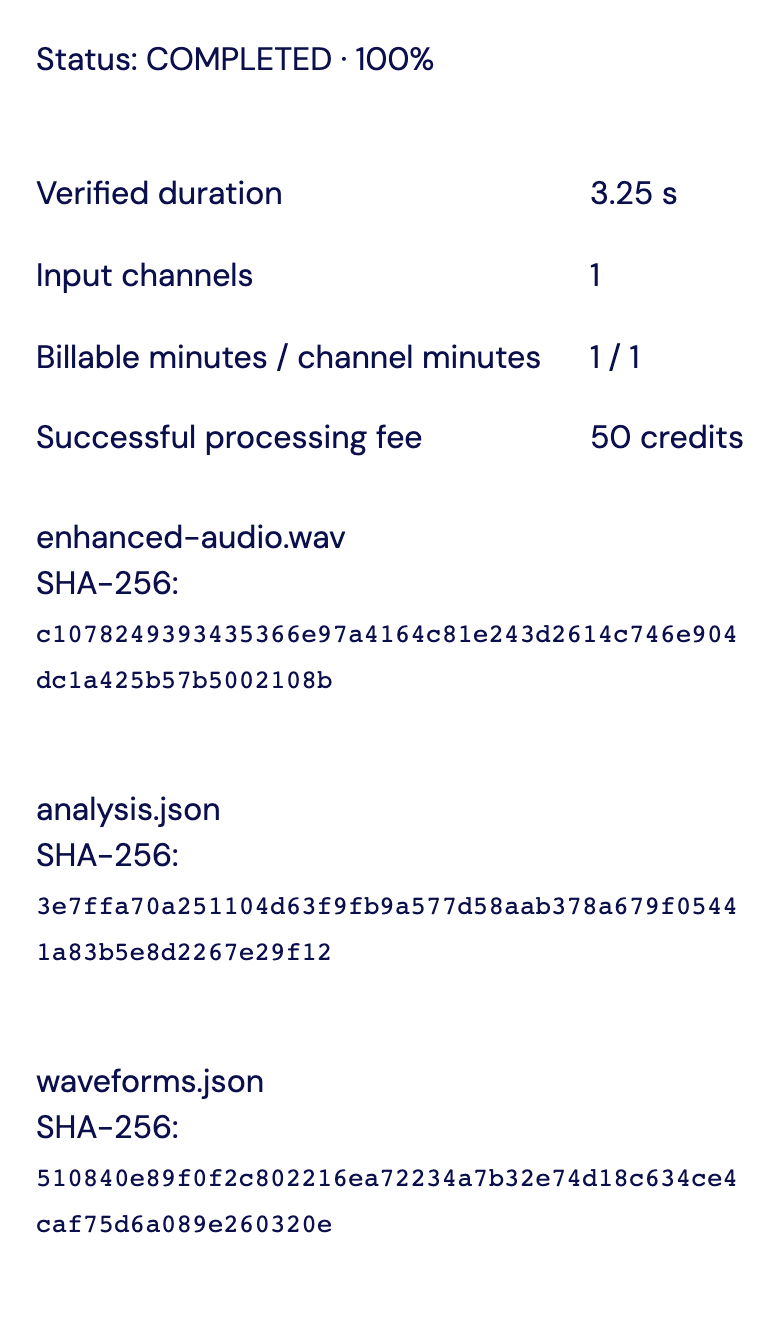
Existing synthetic acceptance task, viewed without creating or reprocessing media. Identifying fields are masked. This screenshot demonstrates result metadata, not an audio-quality benchmark.
To retrieve a result, explicitly call POST /download_links. Claiming credentials changes READY to COMPLETED and releases the lifecycle slot. This does not itself download the artifact. Save the metadata you need for SHA-256 verification, but keep the temporary download URL private.
Each artifact allows three GET requests across all reissued credentials. A Range request consumes one GET; HEAD is free. A failed stream may already have consumed a GET. The reference client makes one download attempt and verifies it; it does not silently retry a failed file GET.
Results are retained for 24 hours from success. Download credentials last at most 15 minutes and do not extend that retention. If credentials expire while the result is still available, explicitly request fresh credentials for the same task. Reissuing them does not reset the three-GET allowance.
Understand billing and handle failures
Billing uses the default input audio track, or the first track if no default exists. Let D be its verified complete duration in seconds and C its original channel count:
M  = ceil(D / 60)
CM = C × M
Other input audio tracks are not added together. A silent video tail beyond the selected audio track does not increase D. Generating a mono waveform does not change the original input channel count used for billing.
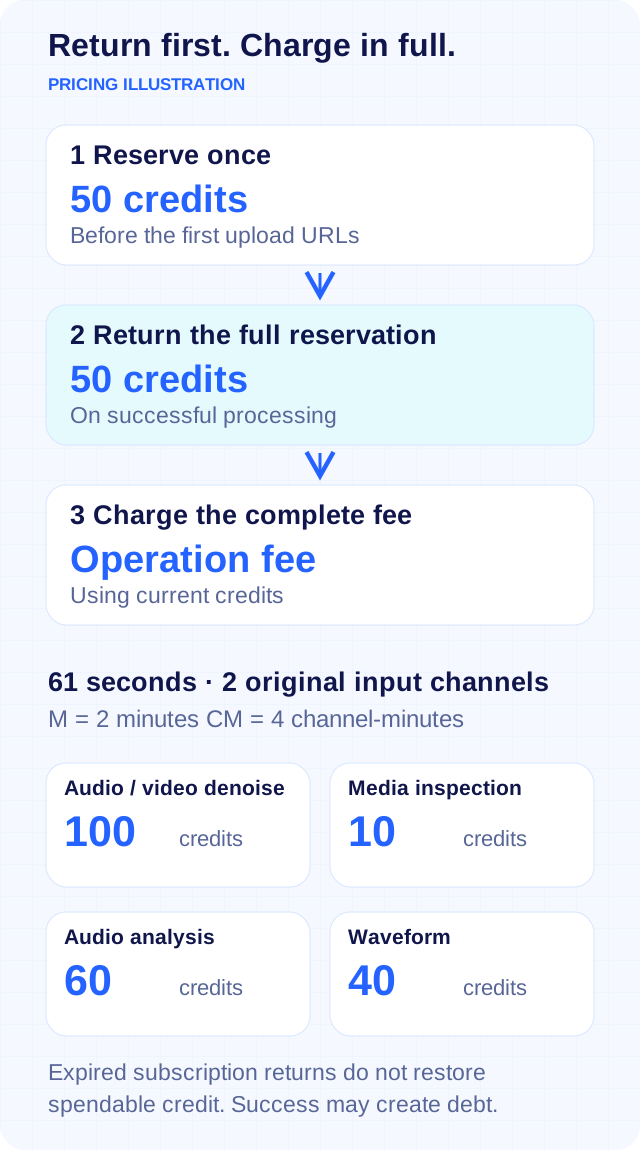
Pricing illustration. A 61-second stereo input costs 100 credits for denoising, 10 for inspection, 60 for analysis, or 40 for a waveform.
On success, the entire original 50-credit reservation is returned, then the full processing fee is charged in the same settlement. The reservation is not a discount against that fee. Returns follow their original credit source and expiry: expired subscription credits are recorded as expired returns and do not restore spendable credit. The success fee uses current credits and can create an amount owed; subsequent spending remains subject to account and Key limits.
After a reservation, cancellation, expiry before success, and proven invalid input retain the 50 credits without a successful processing fee. A service fault returns the reservation without that fee. An uncertain failure requires reconciliation. Before any reservation, these outcomes incur no charge. Expiry of an already successful result does not change its settlement.
Cancel only while UPLOADING or while QUEUED before processing starts; a concurrent start can win. With the client, use python3 audio_cleaner.py cancel --state task.json. Check concurrency before starting a batch: unclaimed READY results still occupy lifecycle slots. Temporary slots are a separate, explicit purchase costing additional_slots × duration_steps × 10000 credits, paid immediately even for scheduled activation; each step is 24 hours.
For production integration, keep task and request identities, distinguish terminal failures from interrupted connections, and require verified artifacts before handing a result to your users. Continue with the full API reference, calling guide, verification checklist, or Audio Cleaner Skill.